Church in a rented hall, without the tech booth
Build the service from home during the week. On the day, a laptop or TV stick sits right by the screen or projector, and you run it from an iPad or phone.
- Prepare from home or anywhere with a browser
- Run lyrics and slides from a tablet or phone
- No booth at the back, no cable down the hall
Ditch the tech booth at the back
A booth means a table to set up, a long cable down the hall and someone stuck behind it all service. With TheOpenPresenter, the laptop or TV stick stays where it plugs in, whether that's a TV or a projector. You run it from a tablet or phone, from anywhere.
- The device stays by the screen, TV or projector
- Run it from a tablet or phone, anywhere in the room
- The worship leader can run their own lyrics
Prepare from home
Your service isn't stuck on the church laptop. Add songs, Bible passages and slides from home on any computer, and it's ready on the day.
- Several people can work on the same service at once
- Sync a Google Slides deck or import PowerPoint
- Send the guest speaker a link to upload their slides
- Paste in a song and AI splits it into slides
How Hope Newcastle does it
TheOpenPresenter started at Hope Newcastle, a church that meets in a rented space and sets up and packs down every Sunday.
We put both our mixer and laptop into a luggage. It lives on the stage and the team runs everything from an iPad. Setting up is quick, because there's almost nothing to set up.
Read how TheOpenPresenter started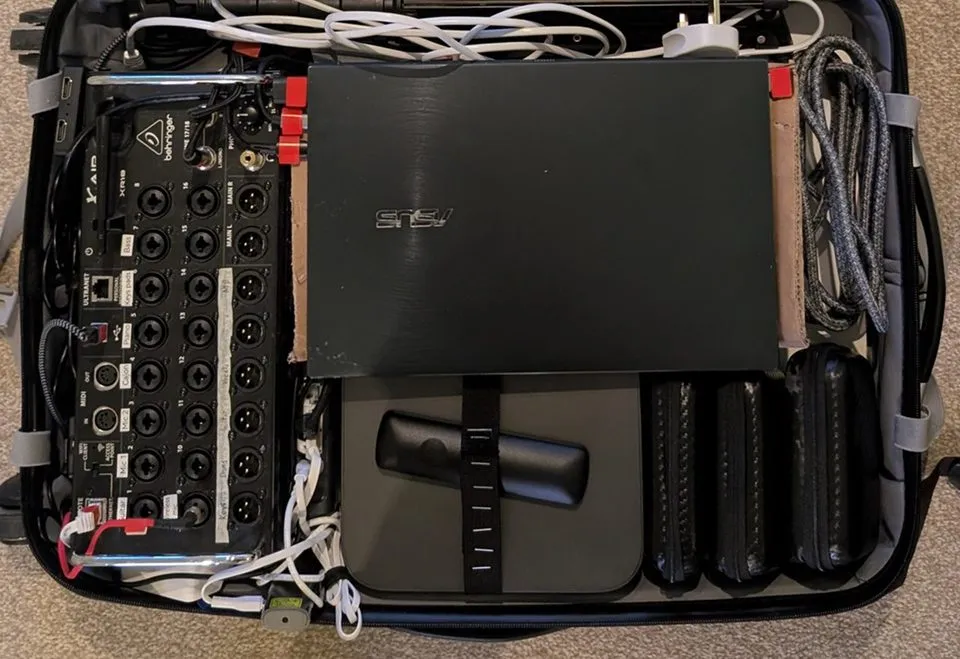
- 1 Plug in power, the screen and the sound
Everything inside is already connected.
- 2 Pick up the iPad
The service was prepared during the week, so it's ready to go.
Built for a church that packs up every week
TheOpenPresenter started at a portable church, so it's built around the way you set up.
Any phone or tablet is the remote
The remote runs in the browser. Nothing to install on the iPad, or on a volunteer's phone.
Or leave the laptop at home
Plug a TV stick into the screen and present straight to it. One less thing to carry.
Works without the venue's Wi-Fi
Studio, our desktop app, runs offline on the laptop, so poor internet at the venue doesn't stop the service.
Lyrics and Bible built in
Song lyrics and over 2,300 Bible translations, from the same remote as everything else.
Slides from where your team works
Sync Google Slides or import PowerPoint, so announcements and sermon slides come straight in.
Videos from anywhere
Upload a video, or play it from YouTube or Vimeo. No DVDs or USB sticks to pack.
Questions
What if the venue has poor Wi-Fi? +
We recommend using a laptop with our desktop app. It syncs online but works fully offline, so nothing gets disturbed if the connection goes down.
Do we need a laptop at all? +
No. A TV stick (Fire TV, Google TV or Android TV) plugged into the screen works. We recommend bringing one if it's easy just as a backup.
Does TheOpenPresenter run our sound? +
You can play music & video that you upload. You can also play from sources like Youtube and Vimeo.
Can more than one person control it? +
Yes. Someone can run the slides from a tablet while the worship leader moves through the lyrics from the stage, with no limit on how many people help.
What does it cost? +
You can start free, and it's free for churches under 50 people. Bigger churches pay one price for the whole church, not per user.
Ready for this Sunday?
Start free.
Build next Sunday's service from home, then run it from a tablet on the day. No card needed.